![n'1fo[r-matik]](https://www.n1fo.fr/wp-content/uploads/2022/04/n1fo-logo-small.svg)
Une nouvelle mouture du navigateur Firefox est arrivée. Pour cette version 157, le navigateur améliore certaines fonctions et en propose de nouvelles…
Tout d'abord, on pourra la toute nouvelle apparence du navigateur grâce à son nouveau thème (Nova). Sur les machines capables, les appels WebRTC peuvent utiliser le décodage matériel de AV1.
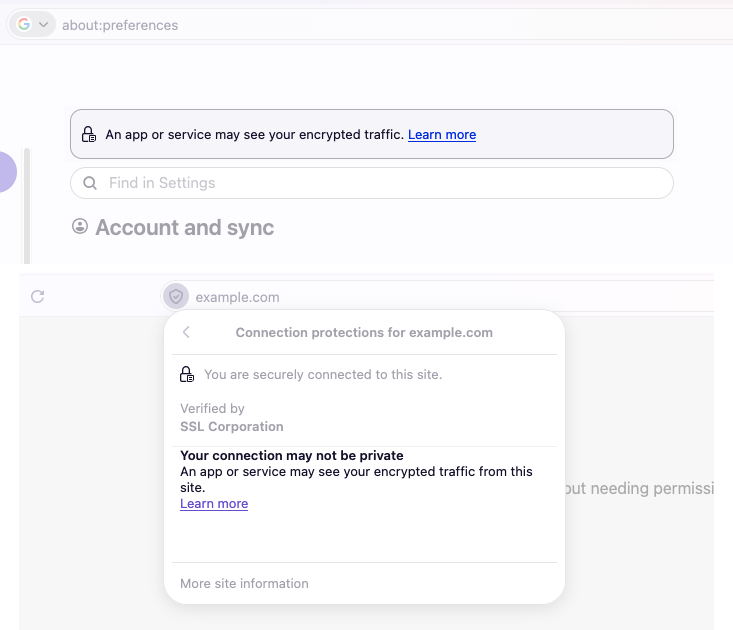
De plus, maintenant préviens si un autre programme est capable lire une session de navigation chiffrée.
Autrement, la barre latérale s'est également refait une beauté, les suggestions de barre d'adresse sont disponible dans plusieurs autres langues.
Côté développeurs, une longue liste de nouvelles fonctions supportées est également fournie.
Voici la liste complète des modifications par rapport à la version précédente :
Nouveautés de Firefox 157.0 (29/09/2026)
New
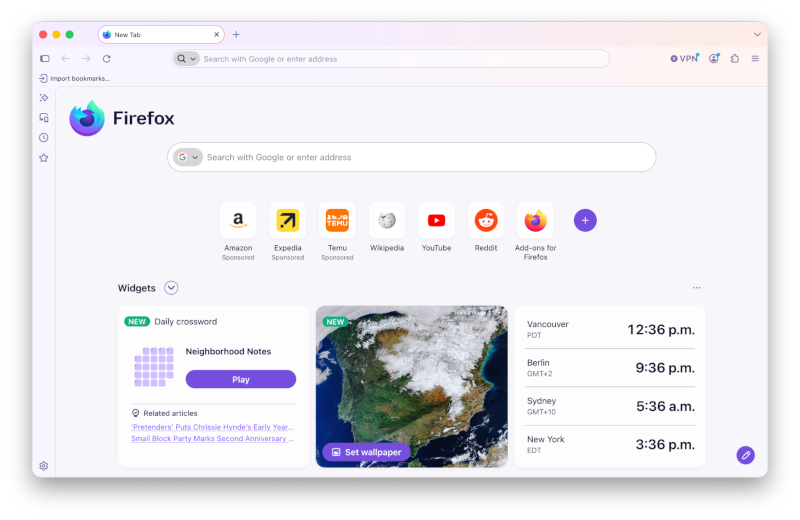 Firefox’s biggest visual refresh in years is now available, with a modernized look across the browser toolbars, sidebar, menus and individual features, built with our updated design system. It also includes:
- New built-in themes with light and dark versions, to personalize the look of Firefox in one click.
- A new compact mode that reduces toolbar and tab spacing to leave more room for web content, useful on smaller screens and in split-screen layouts.
- WebRTC video calls can now use hardware AV1 decoding on devices that support it, instead of always decoding AV1 video in software.
- Firefox now shows a warning in the site information panel (the shield icon in the address bar) and in Settings when it has been set up to record its encryption keys, which could let other software on the computer read encrypted web traffic.
- Firefox Suggest now offers suggestions in the address bar in Austria, Belgium, Czech Republic, Denmark, Finland, Hungary, Ireland, Luxembourg, Netherlands, Norway, Poland, Portugal, Slovakia, Spain, Sweden, and Switzerland. They can be controlled in the Firefox Suggest settings. Learn more.
Changed
- Pressing Tab now moves focus straight to the text field of the address bar and search bar instead of stopping on the search engine button first. The button can still be reached with Shift+Tab.
- Amazon is no longer included as a built-in search engine. It can still be added as a custom search engine in the search settings. Learn more.
- The updated sidebar is now enabled for everyone. Anyone still using the previous sidebar keeps a similar layout, with the panel switcher at the top of the sidebar, and the “Show sidebar” option has been removed from Settings.While we continue to refine the new design, the previous sidebar can still be restored by setting
sidebar.revamptofalseinabout:config. This also turns off vertical tabs. The preference will remain available until the end of 2027. - Web page
alert(),confirm()andprompt()dialogs, the color and date pickers, and form autocomplete drop-downs now match the page’s light or dark color scheme.
Fixed
- Fixed video from phones and tablets appearing sideways or upside down in WebRTC calls.
- Fixed the address bar searching for the typed text instead of opening the selected suggestion when a page was still loading, such as shortly after Firefox started.
- Fixed some HDR videos encoded in 8-bit color formats looking dull and gray on Windows instead of displaying in HDR.
- Improved audio and video synchronization when repeatedly changing the playback speed of videos, for example on YouTube.
- Fixed the Vertical Tabs sidebar not reappearing when the cursor moves to the edge of the screen in full screen mode.
- Fixed an issue on Windows where making a video full screen would leave the Windows taskbar showing over the video.
- Various security fixes.
Web Platform
- Firefox now supports the
at-rule()function for@supports. This allows authors to detect browser support for specific at-rules, such as@supports at-rule(@scope). - Firefox now supports the
chainvalue for the CSSoverscroll-behaviorproperty.
Enterprise
- You can find information about policy updates and enterprise-specific bug fixes in the Firefox for Enterprise 157 Release Notes.
Mozilla Firefox
Version : 157.0
Télécharger pour Windows, macOS ou Linux
