![n'1fo[r-matik]](https://www.n1fo.fr/wp-content/uploads/2022/04/n1fo-logo-small.svg)
Une nouvelle mouture du navigateur Firefox est arrivée. Pour cette version 152, le navigateur améliore certaines fonctions et en propose de nouvelles…
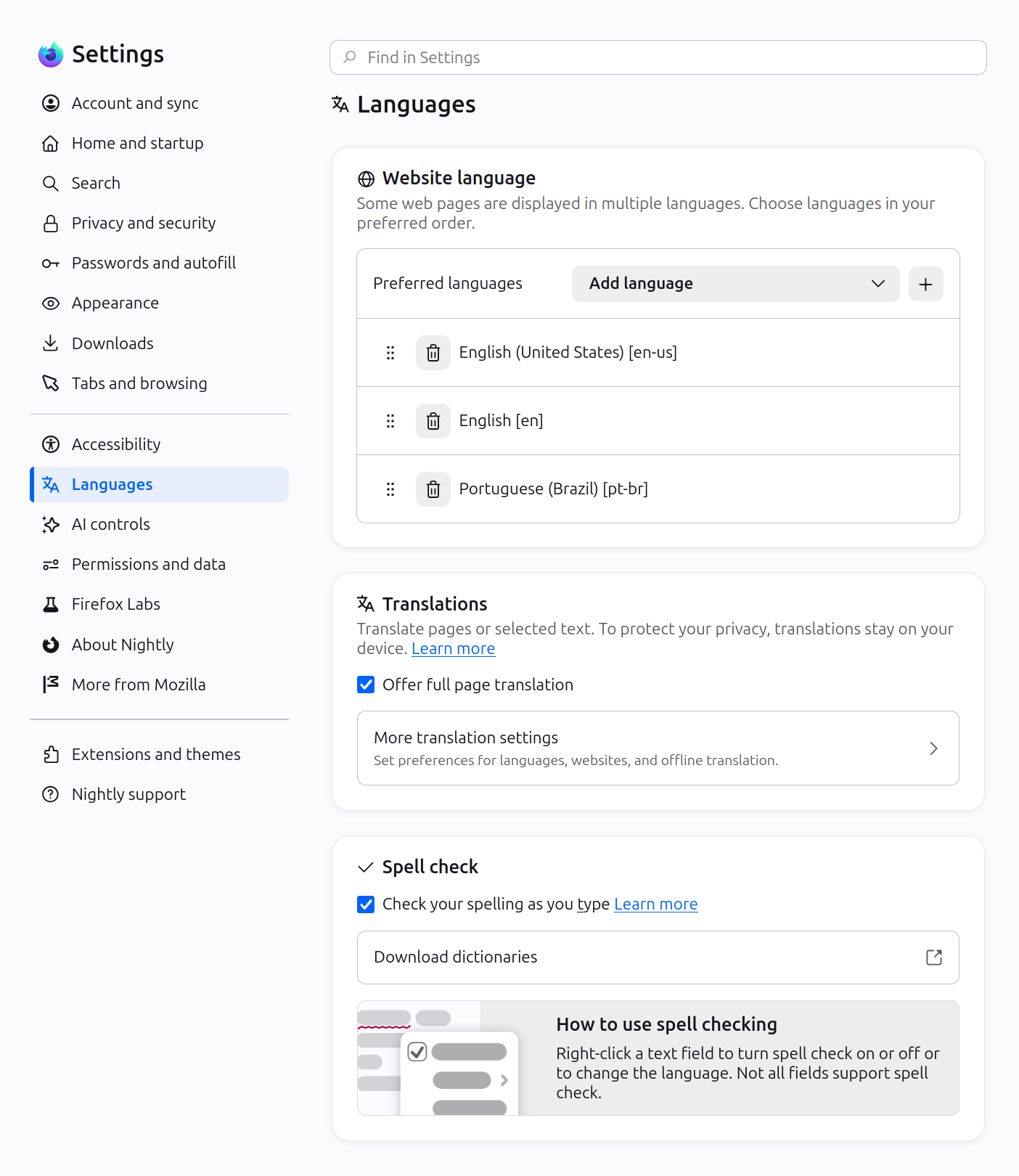
Tout d'abord, le navigateur d'un tout nouveau design pour ses paramètres qui sont désormais mieux catégorisés et donc organisés.
Côté fonctionnalités, toutes les vidéos reçoivent des contrôles de lecture disponible dans le menu contextuel. On peut également couper le son d'un onglet en tapant "sssh" dans la barre d'adresse ou encore désactiver temporaire le bloquer de tracker en mode navigation privée.
Autrement, d'autres améliorations sont disponible concernant le zoom au clavier, l'ouverture d'un PDF en fond après téléchargement ou la copie de liens.
Pour terminer, vous avez désormais la possibilité d'activer le support des fichiers JPEG XL dans les fonctions "Labs" du navigateur. Pour rappel, ce (pas si) nouveau format d'image peut en remplacer plusieurs anciens (Jpeg, PNG, GIF, APNG, WebP, AVIF) de part sa meilleure compression, qualité, vitesse de décodage et la possibilité de transcoder sans perte les fichiers JPEG avec environ 20% de gain d'espace.
Côté développeurs, une longue liste de nouvelles fonctions supportées est également fournie.
Voici la liste complète des modifications par rapport à la version précédente :
New
- Smart Window includes several enhancements:
- Select text on a page and get quick access to summarize, explain, and more using the built-in assistant. (Bug 2034921)
- Added a row of shortcuts to New Tab, making it easier to get back to sites. (Bug 2048338)
Fixed
- Fixed an issue that prevented email tracking protection from being disabled in the redesigned Firefox Settings. (Bug 2049331)
- Fixed a hang that could occur after using a file picker dialog on macOS 26. (Bug 2053177)
- Fixed the homepage not loading for some enterprise configurations that set it using a legacy autoconfig format. (Bug 2047962)
- Various security fixes.
Fixed
- Fixed the Manage payment methods list in Settings appearing empty when a saved payment card had no expiration date. (Bug 2048383)
New
- Smart Window includes several enhancements:
- You can now ask it to close your tabs, with a confirmation step when needed and the option to undo afterward. (Bug 2040769)
- Browsing history results now appear with images. (Bug 2038069)
- When you give feedback on a response, you can now choose from common reasons and preview exactly what will be shared before submitting. (Bug 2033002)
Fixed
- Fixed copy, paste, undo, redo, and similar keyboard shortcuts not working inside macOS system dialogs such as the Save and Open panels. (Bug 2040851, Bug 2040844)
- Fixed the Manage Cookies and Site Data dialog opening with an empty list when opened from the Settings search results. (Bug 2041077)
- Fixed keyboard focus landing in the wrong place after following an in-page link, so pressing Tab continues from the link’s position as expected. (Bug 2049307)
- Various security fixes.
Fixed
- Fixed an issue that could cause extreme memory usage and freezing on startup for users with language packs installed. (Bug 2049845)
Fixed
- Fixed some Settings section headings showing placeholder text instead of the translated name in certain languages. (Bug 2047983)
- Fixed New Tab content not matching the browser's display language after it was changed. (Bug 2046945)
- Fixed a regression that could break playback of some MP4 video files. (Bug 2047467)
- Fixed a performance regression that could slow down sites performing many encryption and decryption operations at once, such as Proton Drive. (Bug 2046401)
Fixed
- Fixed frequent crashes affecting users with Intel Raptor Lake processors. (Bug 2039575)
- Fixed an issue on macOS where choosing a PDF option, such as "Save as PDF", from the system print dialog would send the job to your printer instead of saving a file. (Bug 2047850)
New
- Firefox Settings features a brand-new look with streamlined organization, clearer groupings, and improved navigation for easier customization.
- In Private Browsing windows, you can now temporarily disable tracker blocking for a tab if it's causing a site to break. When you reload a page where trackers were blocked, Firefox shows a message offering to reload without the stricter protections. All other tracking protections stay active.

- You can now mute your browser from the address bar: type "mute" (or "shush" or "sssh") and use the address bar quick action to silence every tab currently playing sound across all Firefox windows.
- Improved support for more advanced cursor movement commands, including those relating to paragraph boundaries, on macOS.
- On Windows and Linux, you can now copy links via the tab context menu by right-clicking a tab and selecting Share > Copy Link, making it easy to copy a link without switching to the tab first. When multiple tabs are selected, you can copy all selected links at once. Windows users still retain access to Microsoft sharing options from the Share menu.
- A "Send tab" toolbar button is now available which can be added via More Tools > Customize Toolbar.
- The following languages are now available for Translations:
- Basque
- Galician
- Firefox builds in Croatian, English (UK), Georgian, Persian, Slovenian, Tajik, Tamil, Tibetan, Turkish, Welsh, and Xhosa now come with a built-in dictionary for the Firefox spellchecker.
Firefox Labs
- Firefox now offers experimental support for the new JPEG XL image format, which generally provides better compression than WebP, JPEG, PNG, and GIF and is designed to supersede them. You can enable it from the Firefox Labs panel in Settings.

Fixed
- Fixed an issue where the Paste option could be missing from context menus when editing content on sites such as Squarespace, LinkedIn, and eBay.
- Improved dragging images from Firefox to the desktop or Finder on macOS — images now save reliably and land where you drop them.
- In multiple monitor situations, the About Firefox window now more reliably opens on the display with the most recently used Firefox window.
- Fixed arrow-key text navigation and word selection commands that moved in the wrong direction in right-to-left text on macOS and Linux.
- Various security fixes.
Changed
- Site zooming via keyboard or mouse now offers more zoom levels in smaller increments than before.
- When a PDF or other file that Firefox opens directly finishes downloading, it now opens in a background tab if you've switched tabs or closed the original page.
- The Tabs from Other Devices panel in the sidebar now lets you open tabs in a new tab or a new container tab from the context menu.
Developer
- Developer Information
- Developer Tools now have an option in the Settings panel to toggle the display of comment nodes in the Inspector.
Web Platform
- Web Notifications can now have action buttons via the
actionsoption. They appear as buttons below the notification text or in the Options list on macOS. - The
field-sizingproperty is now available, allowing form controls to adjust in size to fit their contents. - Firefox now supports the WebAuthn Related Origin Request feature, which simplifies login flows by making Passkeys usable from multiple domains.
- The Pointer Lock API now supports the
unadjustedMovementoption, allowing sites to receive raw mouse-movement data unaffected by OS-level acceleration.
Mozilla Firefox
Version : 152.0.6
Télécharger pour Windows, macOS ou Linux
