![n'1fo[r-matik]](https://www.n1fo.fr/wp-content/uploads/2022/04/n1fo-logo-small.svg)
Une nouvelle mouture du navigateur Firefox est arrivée. Pour cette version 153, le navigateur améliore certaines fonctions et en propose de nouvelles…
Tout d'abord, le support du HDR est désormais disponible pour les utilisateurs sous Windows ayant un moniteur compatible (et l'option activée dans les paramètres d'affichage de Windows).
Côté vie privée, les conteneurs vous permettent d'isoler des sites du reste de votre session de navigation. Aucun moyen de communication de l'intérieur d'un conteneur vers l'extérieur et vice-versa.
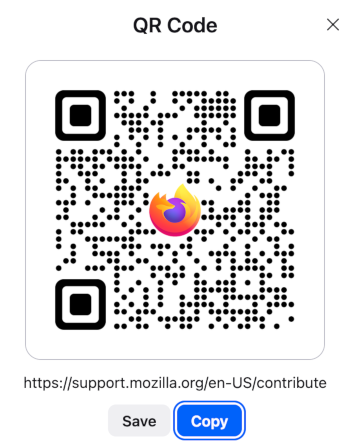
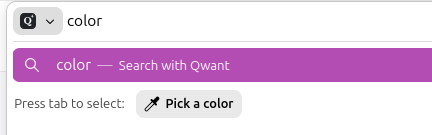
Côté fonctionnalités, la possibilité de pouvoir partager une IRL via QR Code, de nouvelles fonctionnalités pour la gestion des PDF ainsi que la possibilité d'extraire une couleur d'une page en tapant "couleur" dans la barre d'adresse.
Autrement, d'autres améliorations sont disponible concernant les certificats QWACs, les contrôles de lectures de vidéos et la mise en avant de l'icône de permission de localisation en rouge dans la barre d'adresse.
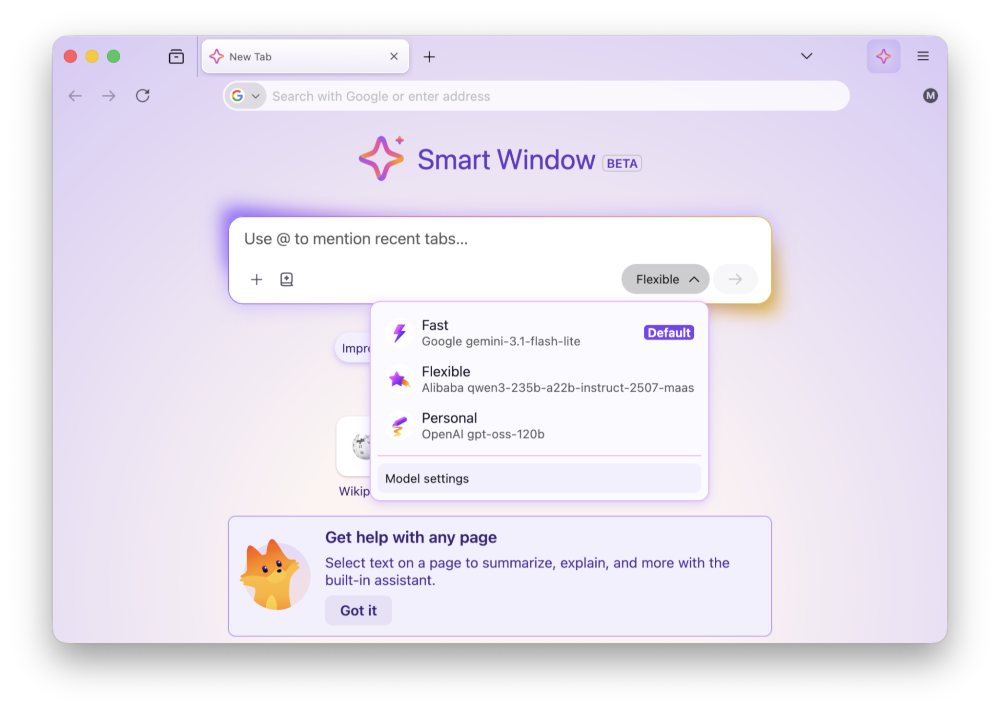
Sans oublier, la fonction Smart Window (fenêtre intelligente) qui permet la sélection du type d'IA à utiliser.
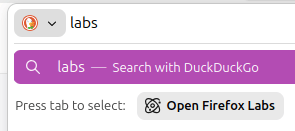
Toujours disponible, la possibilité d'activer le support des fichiers JPEG XL dans les fonctions "Labs" du navigateur.
Côté développeurs, une longue liste de nouvelles fonctions supportées est également fournie.
Voici la liste complète des modifications par rapport à la version précédente :
Nouveautés de Firefox 153.0.4 (11/08/2026)
Fixed
- Fixed Firefox becoming unresponsive when clearing browsing history, which could also result in site data being lost. (Bug 2059647)
Nouveautés de Firefox 153.0.3 (04/08/2026)
New
- Smart Window includes several enhancements:
- Improved suggestions making it easier to find history and switch tabs. (bug 2019042).
- Assistant now includes Exa web search results to answer user queries. (bug 2046183).
- Tabs added to a prompt with an @ mention are now correctly passed to the assistant. (Bug 2042830).
Fixed
- Fixed audio and video failing to play, or hanging when seeking, on websites that load media from a Blob URL (Bug 2056444).
- Fixed Internet shortcuts dragged from Firefox to the desktop being marked as untrusted on Windows, which caused a security warning every time they were opened (Bug 2056865).
- Fixed the Bookmarks, History, and other sidebars failing to open when the sidebar is hidden and the password manager has been turned off by an enterprise policy (Bug 2056857).
- Fixed a Mozilla VPN upgrade offer appearing for people in regions where Mozilla VPN is not sold (Bug 2058264).
- Fixed frequent Inspector crashes in the Developer Tools on pages where an extension content script had added event listeners. (Bug 2042101).
- Fixed a rare case on Windows where starting Firefox while a partial update was still being applied could leave the installation broken and unable to start (Bug 2058197, Bug 2058594).
- Fixed the crash reporter shutting down after a failed startup handshake, which meant later crashes went unreported (Bug 2040673).
Nouveautés de Firefox 153.0.1 (28/07/2026)
Fixed
- Addressed a startup crash on Windows that could occur after updating Firefox, when some of the application's internal files could not be loaded. Firefox should now start in these cases, although parts of the interface may not display correctly until a further update completes (Bug 2056926).
- Fixed audio playing silently on some music and audio streaming sites after pausing and resuming playback (Bug 2053586).
- Fixed the New Tab page background flashing a few seconds after the page loaded when a custom wallpaper was in use (Bug 2056650).
- Fixed a crash that could occur when a page loaded a frame using a
javascript:address (Bug 2054485). - Fixed a crash that could occur while typing text in an editable area of a page (Bug 2053867).
- Fixed a search engine you had already installed yourself being labeled as "New" when Firefox later started offering the same engine (Bug 2053710).
- Improved pointer lock, used by games and other immersive web content, so that the mouse pointer is less likely to escape the Firefox window (Bug 1255338, Bug 2040628).
- Fixed an issue in the Inspector's Rules view where pseudo-elements could only be expanded once per selected element (Bug 2054525).
- Fixed View Page Source failing to load
blob:documents (Bug 2054428). - Fixed View Page Source timing out on documents that inherit their origin, such as frames using the
srcdocattribute (Bug 2054487).
Nouveautés de Firefox 153.0 (21/07/2026)
New
- High Dynamic Range (HDR) video playback is now available on Windows - this feature needs HDR mode enabled for the display in Windows Settings - Display. Laptop displays that only offer “HDR video streaming” are not supported at this time. Some videos recorded on phones in certain orientations are currently not shown as HDR.
- Containers let you keep separate parts of your online life (work, shopping, personal, banking) logged into different accounts in the same browser window, but keep your cookies and ad tracking isolated inside each container.
- Share any open page with a QR code. Right-click a tab, select Share > Generate QR Code. Great for posters, invitations, banners, and other printed materials.
- It is now possible to merge multiple PDFs by dragging a PDF into the PDF sidebar.
- It is now possible to add images as new pages within PDFs using the Firefox PDF editor.
- Quickly pick and copy a color from any page by typing “pick color”, “color picker”, or “eyedropper” in the address bar and selecting the “Pick a color” quick action.
- Added support for Apple’s system-wide full-screen keyboard command (Globe-F).
- Firefox now verifies and displays Qualified Website Authentication Certificates (QWACs) in accordance with eIDAS regulations.
- Added improved support for videos with overlays so users can more easily access video actions from context menus.
- Firefox now highlights the location permission icon in red whenever a website has access to your location. The permission icon is also now visible on search results pages where it was previously hidden.

- Smart Window:
- See and choose AI models directly from the Smart Window assistant.
- New Tab now includes a familiar address bar for typing websites and searching the web.
Changed
- Extensions can no longer access local files by default. Users can grant or revoke this access via the new “Access local files on your computer” permission, separate from “Access your data for all websites”.
- Local Network Access restrictions are now enabled by default for all users. Firefox requires websites to request permission before connecting to devices on your local network or to apps and services on your device.
- Outdated cookie settings have been removed from the Settings UI. Users still in that mode should switch to default behavior “Isolate cross-site cookies”. More information
HTML5
- Firefox now supports a limited subset of the non-standard
::-webkit-scrollbarpseudo-element to improve web compatibility:- Rules with non-zero
width/heightdisable overlay scrollbars for the affected container. display: noneon::-webkit-scrollbarbehaves likescrollbar-width: none, hiding the scrollbar.@supports selector(::-webkit-scrollbar)now evaluates to true.- Full styling capabilities (colors, border-radius, etc.) are intentionally not supported.
- Rules with non-zero
- The
vertical-alignproperty was converted into a shorthand forbaseline-source,alignment-baseline, andbaseline-shiftin Firefox 149. Now,alignment-baselinesupports the new keywordsalphabetic,ideographic,central,mathematical, andhanging, extending the variety of baselines to choose for alignment. - Implemented the new
popover=hintspec, which removes a series of inconsistent and unexpected behaviors. - The circle() and ellipse() functions accept two new keywords
closest-cornerandfarthest-cornerfor their radial size. - The newly added Error.stackTraceLimit property allows to set the maximal depth of the captured JavaScript error stack as a performance optimization.
- Developers can now use the
textimport attribute to import text files using the module system. - The Picture In Picture API exposes a way for web developers to make use of user agent Picture-In-Picture functionality.
- The
Intl.LocaleInfoproposal adds the ability to query Locale information, such as week data (first day in a week, weekend start day, weekend end day), text direction and hour cycle used in the Locale. - The
MediaCapabilities.decodingInfo()andMediaCapabilities.encodingInfo()methods now accept the “webrtc” configuration type. This allows a site to query whether a given audio or video configuration can be decoded or encoded for WebRTC and whether doing so will be smooth and/or powerEfficient.
Developer
- A new “Local Mode” setting in the options panel allows developers to load local directories via custom origins. This simplifies testing for APIs that do not function over standard
file://URLs, removing the need to run a local web server. Multiple directory mappings are supported.
Enterprise
- You can find information about policy updates and enterprise-specific bug fixes in the Firefox for Enterprise 153 Release Notes.
Fixed
- Various security fixes.
Labs
- Firefox Labs can now be opened quickly by typing “labs” or “experiment” in the address bar and selecting the Open Firefox Labs quick action.
- Firefox now offers experimental support for the new JPEG XL image format, which generally provides better compression than WebP, JPEG, PNG, and GIF and is designed to supersede them. You can enable it from the Firefox Labs panel in Settings.
Mozilla Firefox
Version : 153.0.4
Télécharger pour Windows, macOS ou Linux
