![n'1fo[r-matik]](https://www.n1fo.fr/wp-content/uploads/2022/04/n1fo-logo-small.svg)
Une nouvelle mouture du navigateur Firefox est arrivée. Pour cette version 154, le navigateur améliore certaines fonctions et en propose de nouvelles…
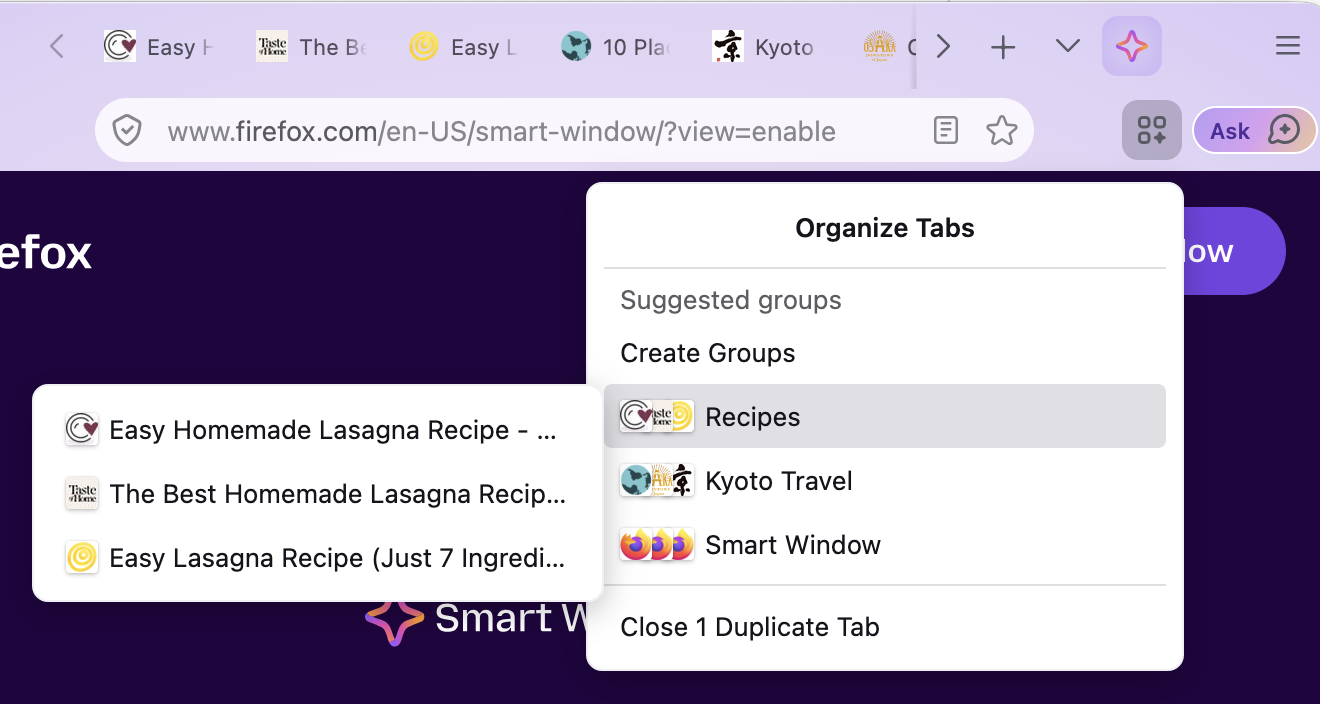
Tout d'abord, dans Smart Window, le navigateur peut suggérer des groupes d'onglets liés au contenu de la page consulté.
Côté fonctionnalités, Firefox est désormais supporté pour jouer sur GeForce NOW, la fonction de traduction peut traduire des pages avec des <iframe> et peut identifier la langue du site.
Autrement, la barre d'adresse abrite des actions rapides pour gérer l'IA intégrée (si active), les installations Windows (hors Microsoft Store) peuvent choisir l'icône de Firefox (à venir sur macOS & Linux bientôt).
Sans compter les différentes corrections de bugs...
Côté sécurité, les Websockets doivent désormais demander une permission pour accéder au réseau local.
Côté développeurs, une longue liste de nouvelles fonctions supportées est également fournie.
Voici la liste complète des modifications par rapport à la version précédente :
Nouveautés de Firefox 154.0.1 (25/08/2026)
Fixed
- Fixed slower access to saved passwords and unexpected Primary Password prompts caused by recent changes to password storage. (Bug 2064411, Bug 2065593, Bug 2063993)
- Fixed an issue where addresses were failing to autofill on some sites. (Bug 2065145, Bug 2063599)
- Fixed Firefox adding a new Start Menu shortcut on Windows every time it started. (Bug 2064652)
- Fixed an issue where connections to local network devices were failing without a permission prompt on some sites loaded over HTTP. (Bug 2059274)
- Fixed a crash that could occur when opening intranet sites that are configured to link to files on a local network share. (Bug 2064648)
- Fixed an issue on Windows where tab titles were cut off at the start when the system font was MS UI Gothic. (Bug 2056856)
Nouveautés de Firefox 154.0 (18/08/2026)
New
- Firefox's Local Network Access protections now extend to WebSocket connections. Websites that try to open a WebSocket to a device on the local network will now ask for permission first.
- In Smart Window, Firefox can now suggest groups of related tabs and propose a name for each group.
- Firefox on Windows is now a supported browser for NVIDIA GeForce NOW, letting users stream supported PC games directly in the browser.
- Local Firefox profile backups are now available on macOS in addition to Windows and Linux, and backups can be restored across all three platforms.
- Sites can now be exempted from having their cookies and site data cleared on shutdown without also being exempted from tracking protection and other cookie restrictions.
- The full-page Translations feature now translates
<iframe>content. - The full-page Translations feature now runs language identification on all page loads, resulting in an improved experience for offering translations to users.
- Windows users can now choose a different Firefox app icon in Settings. This is not yet available for MSIX installations, macOS, or Linux, but is coming soon.
- The address bar now includes a Manage AI quick action that opens the AI controls in Settings.
- Performing a hard reload on a page (holding Shift while clicking the Refresh button) now also clears and updates its cached favicons.
Fixed
- Fixed an issue on macOS where closing a browser window could leave behind an invisible window that continued to capture mouse clicks over the area where it used to be.
- Fixed an issue on Windows where an auto-hiding taskbar would not appear until the Firefox window had been minimized and restored after launch.
- Fixed an issue where the Windows taskbar would appear in front of a full screen Picture-in-Picture window.
- Fixed the Vertical Tabs sidebar staying visible in full screen mode. It now hides along with the toolbars and reappears when the cursor moves to the edge of the screen.
- Fixed PDF documents not being scaled correctly in print preview when the Fit to Page Width option is used.
- Various security fixes.
Changed
- Video seeking is now significantly faster on all operating systems, making it quicker to jump to a point in a video.
- Text selected in a PDF is now highlighted the same way as text on a web page, and the highlight color follows operating system settings such as high-contrast mode.
- Firefox View is moving out of the toolbar by default for new profiles and for profiles where it hasn't been used recently. It can still be opened from List all tabs > View all tabs, or added back from the Customize toolbar menu.
Enterprise
- You can find information about policy updates and enterprise-specific bug fixes in the Firefox for Enterprise 154 Release Notes.
Developer
- Developer Information
- The JSON Viewer now shows a breadcrumb path at the bottom for the selected entry.
Web Platform
- Firefox now supports the
text-box-trimandtext-box-edgeCSS properties, and the associatedtext-boxshorthand. These properties control the leading space above and below text, enabling simpler and more consistent vertical spacing and alignment. - Firefox now supports the
sibling-index()andsibling-count()CSS functions. These functions allow an element to be styled with calculations that use its index among its siblings and its total count of siblings (including itself), respectively. - Added a time picker user interface to
<input type="time">and<input type="datetime-local">, making selecting a time more accessible and intuitive. - Added support for the No-Vary-Search HTTP response header for the HTTP disk cache. Servers can now declare which URL query parameters are irrelevant to the response, allowing Firefox to reuse cached resources across parameter variations and improving cache hit rates.
- Firefox now supports new
Iterator.prototype.chunksandIterator.prototype.windowsmethods that allow consuming an iterator as either overlapping or non-overlapping subsequences of configurable size. - Firefox now supports
Iterator.prototype.includes(), allowing developers to check whether an iterator contains a given value without first converting it to an array. - Firefox now supports the
Iterator.prototype.joinmethod, which allows joining an iterator into a string, similar toArray.prototype.join.
Mozilla Firefox
Version : 154.0.1
Télécharger pour Windows, macOS ou Linux
